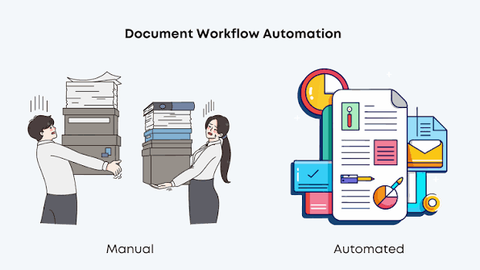
Document Workflow Automation Guide: Approvals, Records, and Business Processes
Document workflow automation uses software to organize how documents are created, reviewed, approved, stored, tracked, and retrieved.
Instead of relying entirely on email, spreadsheets, shared folders, and manual follow-ups, organizations can use automated workflows to route documents between the appropriate people and systems.
Common examples include contracts, invoices, purchase requests, employee records, compliance documents, financial records, applications, policies, and internal approvals.
Why Document Workflow Automation Matters
Organizations often manage large volumes of documents across multiple departments. Manual processes can make it difficult to determine who needs to review a document, which version is current, or whether an approval has been completed.
Document workflow automation can help organizations:
Route documents to the appropriate reviewers
Automate approval sequences
Track document status
Maintain organized records
Reduce repetitive administrative work
Create audit trails
Improve document visibility
Establish consistent business processes
Support compliance documentation
Connect documents with other business systems
The objective is to create a more structured and traceable workflow while maintaining appropriate human oversight.
What Is Document Workflow Automation?
Document workflow automation is the use of software to automate predefined steps associated with electronic documents and business records.
A typical workflow can include:
Create → Review → Approve → Record → Store → Retrieve
Depending on the organization, additional steps may include identity verification, notifications, exception handling, electronic signatures, data validation, escalation, and retention management.
The workflow can be configured around business rules so that documents move automatically between defined stages.
Document Approval Workflows
Approval automation is one of the most common applications.
For example, a purchase request could follow:
Employee Request → Manager Review → Finance Review → Final Approval → Record Storage
A contract may require legal review before executive approval, while an internal policy may require review by compliance and department leadership.
Approval workflows can include:
Sequential approvals
Parallel approvals
Conditional approvals
Multi-level authorization
Delegated approvals
Escalation rules
Approval deadlines
Automated notifications
Rejection and revision workflows
These structures can help organizations maintain consistent approval procedures.
Document Routing and Process Automation
Automated routing determines where a document should go next.
Routing rules can be based on information such as:
Document type
Department
Transaction amount
Geographic location
Risk category
Customer type
Contract type
Approval level
Business unit
For example, a financial document above a defined internal threshold could automatically be routed to additional reviewers.
Rules should be reviewed periodically because organizational structures and regulatory requirements can change.
Records Management
Workflow automation often connects document processing with records management.
A records-management process can help organizations organize:
Contracts
Financial records
Employee documents
Procurement records
Compliance records
Customer documentation
Operational policies
Audit evidence
Legal records
Project documentation
Automated classification can help apply metadata, document categories, retention schedules, access permissions, and other organizational controls.
Document Version Control
Version control helps organizations distinguish between current and previous document versions.
Important capabilities may include:
Version numbering
Revision history
Document comparison
Change tracking
Approval history
Access records
Previous-version preservation
Current-version identification
This can be particularly important when multiple people contribute to the same document.
A controlled workflow can reduce confusion about which version has been reviewed or approved.
Audit Trails and Compliance Records
An audit trail records important events associated with a document or workflow.
A system may track:
Document creation
Upload activity
Version changes
Reviewer identity
Approval events
Rejection events
Signature activity
Dates and times
Workflow changes
Access events
Record retention activity
Audit information can help organizations reconstruct the history of a document when internal reviews or external audits require supporting evidence.
The exact information required depends on the organization, industry, document type, and applicable rules.
Electronic Signatures
Document workflows can integrate electronic-signature technology when a document requires formal approval or acknowledgment.
An electronic-signature workflow may include:
Document preparation
Signer identification
Authentication
Signing intent
Signature placement
Timestamping
Audit-record creation
Document preservation
Electronic signatures and cryptographic digital signatures are related but distinct concepts. Organizations should evaluate the appropriate technology based on the document, transaction, jurisdiction, and applicable requirements.
Business Process Automation
Document automation can extend beyond individual files and connect documents to larger business processes.
Examples include:
Procurement approvals
Invoice processing
Contract management
Employee onboarding
Expense approvals
Compliance reviews
Customer onboarding
Vendor documentation
Financial reporting
Policy management
Regulatory documentation
Integrating document workflows with broader business processes can reduce manual handoffs and provide better visibility into process status.
Document Workflow Integrations
Document workflow platforms can connect with other enterprise systems.
Common integrations include:
Enterprise resource planning systems
Customer relationship management platforms
Human resources systems
Accounting platforms
Procurement software
Contract lifecycle management platforms
Enterprise content management systems
Electronic-signature platforms
Business intelligence tools
Cloud storage systems
Integration can allow information to move between systems without requiring users to repeatedly enter the same data.
Automation and Artificial Intelligence
Artificial intelligence can expand document workflow capabilities.
Potential applications include:
Document classification
Data extraction
Optical character recognition
Contract analysis
Metadata generation
Duplicate detection
Document summarization
Workflow recommendations
Anomaly detection
Intelligent routing
Search enhancement
AI-generated classifications or recommendations should be reviewed according to the risk associated with the underlying process.
Organizations should also establish controls for data privacy, model accuracy, access permissions, and human review.
Document Data Extraction
Many organizations receive information in semi-structured or unstructured formats.
Automated extraction technology can identify information such as:
Names
Dates
Invoice numbers
Contract terms
Account information
Purchase amounts
Document categories
Reference numbers
Extracted information can then be transferred into business systems or used to trigger workflow rules.
Data extraction should include validation procedures because automated systems can misinterpret incomplete, unusual, or low-quality documents.
Security and Access Control
Document workflows frequently contain sensitive business information.
Security controls may include:
Role-based access
Multi-factor authentication
Encryption
Access logging
Data-loss prevention
Secure storage
Backup procedures
Permission reviews
Session controls
Retention controls
Access should generally be based on business need and organizational policy.
Sensitive documents may require additional safeguards depending on the information involved and the applicable regulatory environment.
Data Governance
Reliable workflow automation depends on organized data.
Organizations should establish policies for:
Document classification
Metadata
Data ownership
Access permissions
Retention
Deletion
Data quality
Records integrity
System integrations
Auditability
Clear ownership is especially important when documents move across multiple departments.
Document Retention
Retention policies determine how long particular records should remain available.
Retention requirements can depend on:
Document type
Industry
Jurisdiction
Contractual obligations
Tax requirements
Regulatory requirements
Litigation considerations
Internal policies
Automated retention rules can help identify records approaching the end of their defined retention period.
Organizations should verify applicable requirements before automatically deleting records.
Document Workflow Automation by Department
Different departments can use document automation in different ways.
Finance
Finance teams may automate:
Invoice approvals
Expense documentation
Payment authorization
Financial records
Budget approvals
Audit documentation
Human Resources
HR workflows may include:
Employee records
Onboarding documentation
Policy acknowledgments
Performance documents
Benefits records
Personnel approvals
Procurement
Procurement teams can automate:
Purchase requests
Vendor documentation
Purchase approvals
Contract records
Supplier compliance documents
Legal and Compliance
Legal and compliance teams may use workflows for:
Contract reviews
Policy approvals
Regulatory records
Compliance documentation
Legal correspondence
Audit evidence
Document Workflow Implementation
Organizations considering workflow automation can follow a structured process.
1. Map existing workflows
Document how files currently move between departments and identify manual handoffs.
2. Identify high-volume processes
Focus initially on workflows involving frequent approvals, repetitive data entry, or extensive document tracking.
3. Define business rules
Establish who should review, approve, reject, or receive each document type.
4. Establish data standards
Define document categories, metadata, naming conventions, and ownership.
5. Review integrations
Identify the business systems that need to exchange documents or data.
6. Establish security controls
Define user roles, authentication requirements, access policies, and audit requirements.
7. Test workflows
Test normal, rejected, incomplete, and exception scenarios before broader implementation.
8. Monitor performance
Review workflow completion times, bottlenecks, errors, and exception rates after deployment.
Document Workflow Planning Checklist
Organizations evaluating document workflow automation can consider:
Identify document-intensive processes
Map existing approval workflows
Identify manual bottlenecks
Define approval rules
Establish document classifications
Review version-control requirements
Define retention requirements
Evaluate electronic-signature capabilities
Review system integrations
Assess data-extraction capabilities
Evaluate AI features
Establish access controls
Review audit-trail capabilities
Define data-governance policies
Test exception workflows
Establish performance metrics
Plan user training and adoption
Recent Developments in Document Workflow Automation
Document automation continues to evolve as organizations adopt cloud platforms, AI-assisted processing, and integrated business systems.
Important developments include:
AI-assisted document classification
Intelligent data extraction
Automated workflow recommendations
Cloud-based records management
Improved enterprise integrations
Digital identity integration
Advanced search capabilities
Automated compliance monitoring
Enhanced workflow analytics
Greater emphasis on data governance
Organizations are also placing greater emphasis on explainability, access controls, privacy, and human oversight when AI is used in document-intensive processes.
Laws, Policies, and Compliance Considerations
Document workflows can be affected by legal and regulatory requirements involving:
Data protection
Privacy
Electronic signatures
Records retention
Financial reporting
Employment records
Tax documentation
Industry-specific compliance
Legal holds
Information security
Requirements vary considerably by jurisdiction and document type.
Organizations should avoid assuming that one retention period, approval process, or electronic-signature method applies to every type of record.
Tools and Resources
Useful resources for document workflow planning include:
Document management platforms
Enterprise content management systems
Workflow automation platforms
Electronic-signature technology
Records-management frameworks
Business process management tools
Enterprise resource planning systems
Customer relationship management platforms
Data-governance frameworks
Cybersecurity and privacy guidance
FAQs
1. What is document workflow automation?
Document workflow automation uses software to organize and automate predefined steps for creating, reviewing, approving, storing, tracking, and retrieving documents.
2. What types of documents can be automated?
Organizations can automate workflows involving contracts, invoices, purchase requests, employee records, compliance documents, policies, financial records, applications, and many other electronic documents.
3. How does document approval automation work?
Approval automation routes a document to designated reviewers according to predefined rules. The workflow can include sequential or parallel approvals, notifications, escalations, revisions, and final record storage.
4. Can document workflow automation integrate with ERP and CRM systems?
Yes. Many platforms can integrate with ERP, CRM, accounting, procurement, HR, electronic-signature, and other enterprise systems. Capabilities vary by platform and configuration.
5. How does AI support document workflows?
AI can assist with document classification, information extraction, summarization, intelligent routing, search, anomaly detection, and other tasks. Appropriate human review and governance remain important for higher-risk workflows.
Conclusion
Document workflow automation connects document processing with structured business processes, approval rules, records management, and enterprise systems.
A well-designed workflow can improve visibility into document status, establish clearer approval procedures, maintain records, and reduce repetitive administrative activities.
Organizations evaluating document workflow automation should consider workflow complexity, document volume, approval requirements, system integrations, security, retention, data governance, AI capabilities, and applicable regulatory requirements.

Related Post...

Project Portfolio Management Guide: Project Priorities, Resources, and Business Planning
Updated: September 23, 2026
Read More
Professional Services Automation Guide: Projects, Time Tracking, and Business Operations
Updated: September 23, 2026
Read More
Electronic Data Interchange Guide: B2B Transactions, Supply Chains, and Business Integration
Updated: September 23, 2026
Read More