Cloud Disaster Recovery Guide: Backup Systems, Recovery Planning, and Data Protection
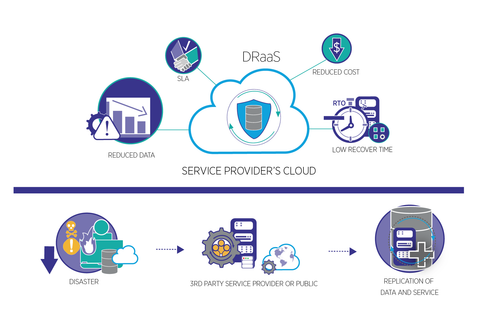
Cloud disaster recovery is the process of using cloud-based infrastructure, storage, applications, and management tools to restore digital systems and information after an unexpected disruption.
Disruptions may result from:
Cybersecurity incidents
Ransomware
Hardware failure
Software errors
Natural disasters
Power interruptions
Network outages
Human mistakes
Cloud configuration problems
Third-party technology failures
Cloud disaster recovery is designed to help organizations restore essential operations while reducing the effects of downtime and data loss.
Unlike traditional recovery models that depend entirely on physical facilities, cloud-based approaches may use remote storage, replicated workloads, virtual machines, automated deployment, and geographically separated infrastructure.
Core Components of Cloud Disaster Recovery
A cloud disaster recovery strategy commonly includes:
Cloud backup systems
Replicated applications
Protected data storage
Recovery automation
Identity and access controls
Network configuration
Monitoring and alerting
Recovery documentation
Business continuity procedures
Recovery testing
Each component supports a different part of the recovery process.
Common Cloud Recovery Models
| Recovery Model | General Description |
|---|---|
| Backup and Restore | Systems are restored from protected backup copies |
| Pilot Light | A small core environment remains available for recovery |
| Warm Standby | A partially active recovery environment is maintained |
| Hot Standby | A more continuously available duplicate environment supports rapid recovery |
| Cloud Replication | Data or workloads are copied to another environment |
| Hybrid Recovery | Cloud resources are combined with on-premises infrastructure |
The appropriate model depends on business requirements, system dependencies, recovery targets, technical complexity, and available resources.
Why Cloud Disaster Recovery Matters
Digital systems support financial operations, customer communication, healthcare records, logistics, manufacturing, education, and many other activities.
A disruption may affect:
Access to business applications
Customer transactions
Employee productivity
Financial reporting
Communication systems
Inventory information
Operational records
Regulatory documentation
Customer confidence
Cloud disaster recovery planning helps organizations prepare for these situations by identifying critical systems and establishing practical restoration procedures.
Benefits of Cloud-Based Recovery
Organizations may benefit from:
Remote access to recovery resources
Flexible infrastructure capacity
Geographic separation of backup copies
Faster system restoration
Centralized recovery management
Improved scalability
Reduced dependence on one physical location
Better recovery visibility
Support for business continuity
Cloud recovery does not automatically guarantee rapid restoration. Results depend on network availability, backup integrity, system complexity, access permissions, and recovery testing.
Important Recovery Planning Factors
Organizations commonly evaluate:
Critical business applications
Data classification
Backup frequency
Storage locations
Recovery priorities
Recovery Point Objective
Recovery Time Objective
Network dependencies
Authentication systems
Vendor dependencies
Security requirements
Compliance obligations
Recovery testing procedures
A structured assessment helps align recovery planning with business priorities.
Recovery Planning Overview
| Planning Area | Primary Purpose |
|---|---|
| Critical Systems | Identify essential applications |
| Data Classification | Determine information sensitivity |
| Backup Strategy | Maintain recoverable information |
| RPO | Define acceptable data loss |
| RTO | Define target restoration time |
| Security Controls | Protect recovery environments |
| Vendor Review | Identify external dependencies |
| Testing | Confirm recovery procedures |
| Documentation | Clarify responsibilities |
Backup Systems and Data Protection
Cloud backup systems create copies of data that can be used for restoration after accidental deletion, system failure, corruption, or other disruptions.
A strong backup strategy may include:
Multiple backup copies
Separate storage locations
Offline or isolated copies
Immutable backup options
Encryption
Access restrictions
Backup monitoring
Retention policies
Restoration testing
Documented recovery procedures
Backup systems should be protected from unauthorized access because attackers may attempt to delete or encrypt backup copies during a cyber incident.
Backup Types
| Backup Type | General Function |
|---|---|
| Full Backup | Copies the selected data set |
| Incremental Backup | Copies changes since the previous backup |
| Differential Backup | Copies changes since the last full backup |
| Snapshot | Captures a point-in-time system or storage state |
| Replication | Copies data or workloads to another environment |
| Archive | Retains information for longer-term reference |
Different backup methods may be combined according to recovery needs and storage policies.
Recovery Point Objective and Recovery Time Objective
Two important disaster recovery concepts are:
Recovery Point Objective (RPO): The amount of data loss an organization is prepared to tolerate, measured in time.
Recovery Time Objective (RTO): The target time within which a system or business function should be restored.
For example, a critical payment application may require a shorter RPO and RTO than an internal reference system.
These targets help organizations determine backup frequency, replication requirements, infrastructure capacity, and recovery priorities.
Cloud Security and Recovery
Recovery environments must be protected because they may contain sensitive information and privileged access.
Security practices may include:
Multi-factor authentication
Role-based access controls
Privileged-account management
Encryption
Network segmentation
Secure key management
Security logging
Vulnerability management
Backup isolation
Access reviews
Organizations should also review cloud-provider responsibilities and understand which security tasks remain under the organization’s control.
Business Continuity Planning
Business continuity planning focuses on maintaining essential activities during and after a disruption.
A cloud recovery plan may support continuity for:
Customer communication
Financial processing
Employee collaboration
Inventory management
Production operations
Data access
Supplier coordination
Administrative workflows
Business continuity planning should also address manual procedures, alternate communication methods, emergency responsibilities, and prioritization of essential functions.
Disaster Recovery Testing
Testing helps determine whether recovery procedures work as intended.
Organizations may conduct:
Backup restoration tests
Application recovery tests
Network recovery tests
Access-control tests
Failover exercises
Tabletop exercises
Full recovery simulations
Vendor recovery assessments
Testing can reveal problems involving outdated documentation, missing permissions, incompatible systems, insufficient capacity, or incomplete backups.
Recent Developments in Cloud Disaster Recovery
During 2025 and 2026, cloud disaster recovery planning continued emphasizing ransomware resilience, automated recovery, cloud security, identity protection, third-party risk, and improved backup verification.
Automated Recovery
Automation may support:
Infrastructure deployment
Workload restoration
Backup verification
Configuration recovery
Failover procedures
Incident notifications
Recovery documentation
Automated recovery should be tested carefully because incorrect configurations may reproduce problems in the recovery environment.
Multi-Cloud and Hybrid Recovery
Organizations may use more than one cloud provider or combine cloud and on-premises infrastructure to reduce dependency on a single environment.
Planning may include:
Data portability
Application compatibility
Network connectivity
Identity integration
Backup duplication
Vendor dependencies
Recovery orchestration
Multi-cloud recovery can add flexibility but may also increase complexity.
AI and Predictive Monitoring
AI-supported monitoring may help identify unusual system behavior, capacity problems, or possible security events.
Potential applications include:
Anomaly detection
Predictive maintenance
Performance monitoring
Automated alerting
Capacity forecasting
Recovery prioritization
AI tools should be evaluated carefully for accuracy, privacy, security, and operational reliability.
Laws or Policies
Cloud disaster recovery may involve privacy rules, cybersecurity obligations, contractual requirements, industry regulations, and data-retention policies.
Data Privacy
Organizations should identify applicable requirements involving:
Personal information
Sensitive business records
Data retention
Cross-border data transfers
Access controls
Encryption
Third-party processing
The applicable obligations depend on the organization, the information involved, and the relevant jurisdiction.
Contractual Requirements
Business agreements may specify requirements for:
Data protection
Backup retention
Recovery time
Incident notification
Security controls
Vendor responsibilities
Service availability
Audit rights
Organizations should review contracts with cloud providers and other critical technology partners.
Compliance Documentation
Recovery documentation may support audits and internal reviews. Records may include:
Backup reports
Recovery test results
Access reviews
Incident records
Configuration documentation
Vendor assessments
Business continuity plans
Security policies
Helpful Tools and Resources
Organizations commonly use:
Cloud backup platforms
Disaster recovery management tools
Infrastructure-as-code tools
Monitoring dashboards
Identity management systems
Security information and event management platforms
Backup verification tools
Recovery runbooks
Asset inventories
Network diagrams
Business impact assessments
Incident response plans
Cloud Disaster Recovery Checklist
Before implementing or reviewing a recovery plan, organizations may consider:
Identify critical systems.
Classify sensitive information.
Define RPO and RTO targets.
Review backup frequency.
Protect backup credentials.
Maintain isolated backup copies.
Document recovery dependencies.
Review cloud-provider responsibilities.
Test restoration procedures.
Confirm emergency contacts.
Review legal and contractual obligations.
Update recovery documentation regularly.
Cloud Recovery Workflow
| Stage | Primary Purpose |
|---|---|
| Assessment | Identify systems and potential impact |
| Planning | Define recovery priorities and targets |
| Backup | Create protected copies of information |
| Monitoring | Detect disruptions and unusual activity |
| Containment | Limit further damage where necessary |
| Restoration | Recover data, applications, and infrastructure |
| Validation | Confirm security and functionality |
| Resumption | Restart essential business operations |
| Review | Improve future recovery planning |
Frequently Asked Questions
What is cloud disaster recovery?
Cloud disaster recovery is the use of cloud-based infrastructure, storage, applications, and procedures to restore systems and information after a disruption.
Is cloud backup the same as disaster recovery?
No. Cloud backup focuses mainly on maintaining recoverable copies of information. Disaster recovery also includes application restoration, infrastructure recovery, access management, testing, and business continuity planning.
What are RPO and RTO?
RPO defines the amount of data loss an organization can tolerate over time. RTO defines the target time for restoring a system or business function.
Are cloud backups protected from ransomware?
Protection depends on the backup design and security controls. Isolated, immutable, encrypted, and access-restricted backups may reduce exposure, but no backup arrangement should be assumed to be completely immune to attack.
How often should disaster recovery plans be tested?
Testing frequency depends on system criticality, organizational risk, regulatory requirements, and technology changes. Critical environments generally benefit from regular restoration and recovery exercises.
Conclusion
Cloud disaster recovery combines backup systems, data protection, recovery planning, cloud infrastructure, cybersecurity, and business continuity to help organizations prepare for unexpected disruptions.
A strong strategy identifies critical systems, defines RPO and RTO targets, protects backup copies, documents recovery procedures, and tests restoration processes regularly.
During 2025 and 2026, cloud recovery strategies continued emphasizing ransomware resilience, automated restoration, identity protection, hybrid infrastructure, and improved backup verification.
Organizations should review their technology environment, security controls, vendor dependencies, legal obligations, and recovery priorities before selecting a cloud disaster recovery approach.
This article provides general educational information and does not determine the appropriate recovery architecture, provider, backup configuration, or compliance requirements for a specific organization.

Related Post...

SaaS Business Guide: Cloud Software, Subscription Platforms, and Enterprise Technology
Updated: September 01, 2026
Read More
Enterprise Data Governance Guide: Data Stewardship, Quality Assurance, and Security
Updated: August 14, 2026
Read More
Data Governance Strategy Guide: Data Lifecycle Management, Quality Controls, and Compliance
Updated: August 14, 2026
Read More